
By Ashish
public addresses are register as , globally unique . and can be used to provide reachability over the internet.
In IPv4 private addresses have been always associated with unregisterd which in return have been associated with non unique addresses.
Public addresses are used to get connectivity across the internet , to reach public resources.
Private addresses are used to accomplish the following :
Increases the addressable space used internally .
- Increases the addressable space used internally .
- Avoid addresses regestration pains .
- Protect the internal network from the public domain .
RFC 1918 identifies two categories
- hosts that do not require acess to hosts in other enterprises or the internet .
- hosts that need access to a limited set of outside services .(e-mail ,FTP and so on ) that can be handel by intermediate gateways .
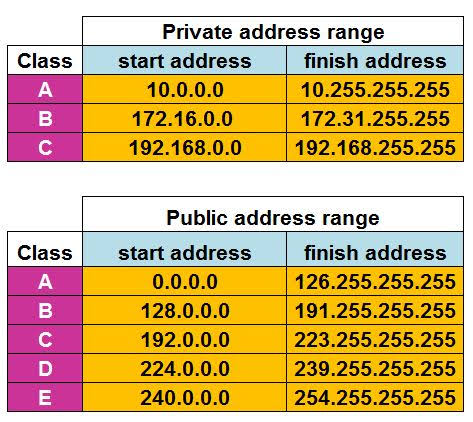
How to check which type of IP address you are using?
The easiest way to find your public IP address is to Google: “What is my IP address?” Depending on your ISP, you might see both Ipv4 and Ipv6 listed due to the increasing use of IPv6 addresses over IPv4.
To find what network you are connected to on a Windows computer or laptop:
- Click on the wireless/Wi-Fi icon in the bottom right-hand corner of your screen.
- Locate the network that says Connected, secured. This is the network you are currently connected to.
phone/device
To find what network you are connected to on your Android phone:
- Go to Settings.
- Click on Wi-Fi/Connections/Network.
- Find the Wi-Fi option. This should reveal what network you are connected to.
Or you can check on Microsoft Support web. If you are using Windows ..
 AshuCodes
Leave a comment